How to use Wacky Stream Boards
Big, bright game boards for your live breaks. You type in a Google Sheet. The board on your TV changes by itself. Most people are set up in about 10 minutes.
1What this is
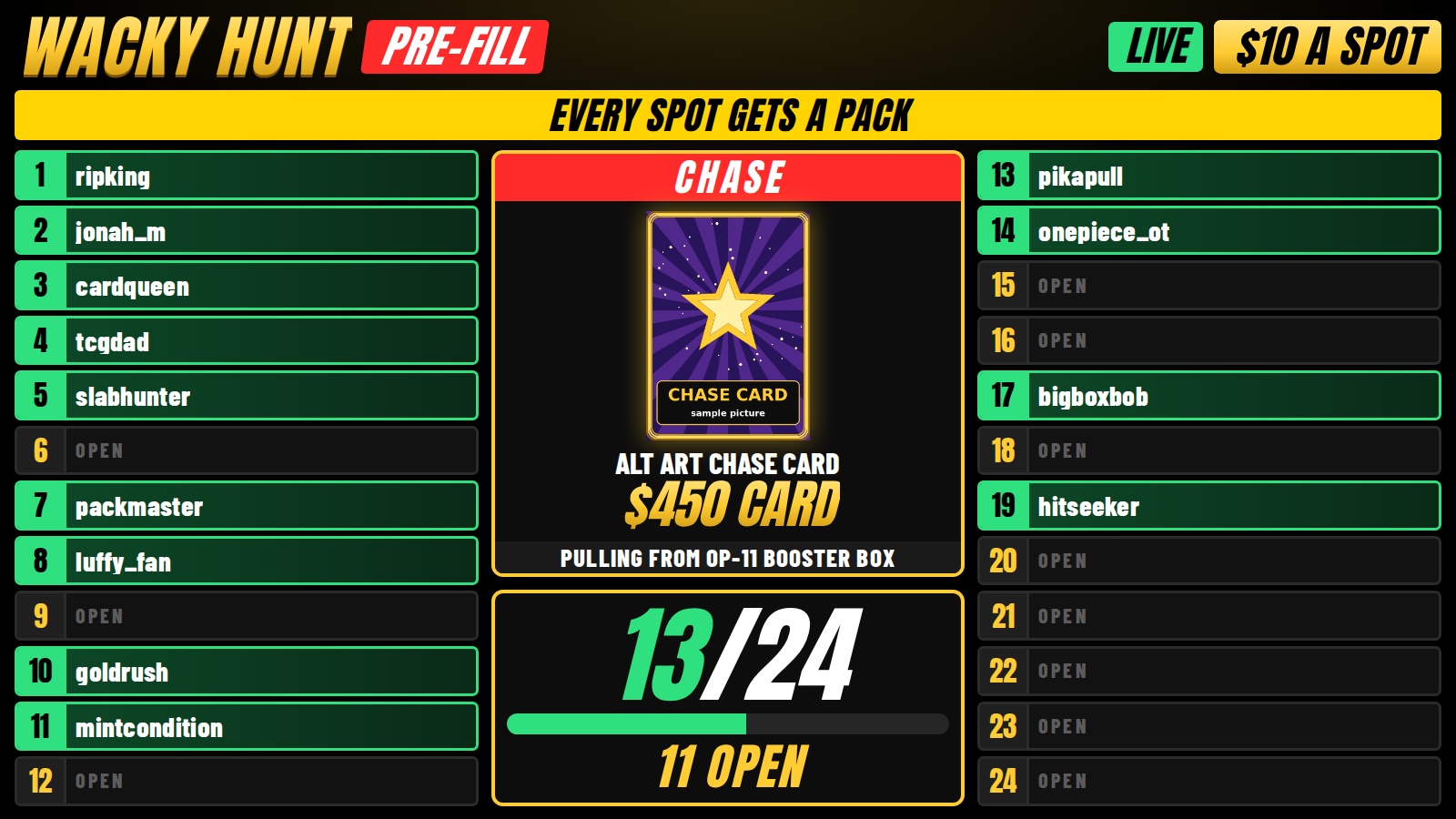
When you rip packs on a live stream, people want to see who owns which spot. They want to see the chase card. They want to see the hits.
Wacky Stream Boards puts all of that on a big screen behind you. It looks clean on a phone, even from far away.
Here's the best part. You never touch the board. You only type in a Google Sheet, like a simple spreadsheet. The board reads the sheet every few seconds and updates by itself.
2What you need
You don't need fancy gear. Here's what matters most, in order.
A phone to go live
Any newer iPhone or Android works. Use the back camera. It's much sharper than the front one.
A phone tripod or mount
Keeps the shot steady. Get one that can hold the phone at your chest height.
A TV or monitor
This sits behind you and shows the board. 40 inches or bigger is best. A 24 to 32 inch monitor works for small tables.
Something to open the board on the TV
A laptop with an HDMI cable, a small mini PC, or a smart TV web browser. Anything that can open a web page.
Good Wi-Fi
Aim for at least 10 Mbps upload. Run a free speed test before you go live. Plug in with a cable if you can.
A Google account
It's free. This is where your game sheet lives.
A light for your face and cards
A ring light or a small LED panel. Put it in front of you, not behind you.
A second screen for the sheet
A tablet, laptop, or second phone so you can type names while you rip.
A label printer
Only if you sell spots in your shop. Any 4x6 thermal shipping printer works (Rollo, MUNBYN, Phomemo, Zebra). For small stickers, a DYMO LabelWriter or Brother QL works too.
A computer for streaming software
Only if you want the board inside your video with OBS or TikTok LIVE Studio. A phone is fine to start.
3The 10 minute setup
- Get your game sheet. Open the sheet link from the Downloads page. Click File > Make a copy so you have your own. Then click Share, set General access to Anyone with the link, and set it to Viewer. The board can't read a private sheet.
- Make your board link. On the computer hooked up to your TV, go to boards.wackymclovin.com. Scroll to Using your own copy of a sheet. Paste your sheet link, pick your game, and click Make my link.
- Open your board. Click Open. Bookmark that page so you never have to do this again. Press F11 (Windows) or Control + Command + F (Mac) to make it full screen.
- Test it. On your phone or laptop, open your sheet. Type a name next to spot 1. Look at the TV. The name shows up in about 5 seconds. That's it. It works.
- Set up your shot. Put the TV behind where you sit. Put your phone on the tripod in front of you, about chest high. Make sure the whole board fits in the shot above your shoulders.
- Fix the glare. Turn the TV brightness down to about 60%. Turn off room lights that bounce off the screen. On iPhone, tap and hold on the TV in your camera to lock the focus.
- Go live. Open TikTok, tap the + button, swipe to LIVE, add a title, and go. Keep your sheet open on your second screen.
4Running a game night
Filling spots
Your main sheet has three game tabs: AUCTION, $10, and $30. Each one has spots 1 to 24.
- Type the buyer's name in column B next to their spot.
- On the auction board, type their bid in column C. The board shows the high bidder with a gold crown.
- Type
FREEin column C for a free spot. Typewinnerin column D to tag a winner.
Setting the chase card
Each game tab has a matching _CHASE tab (like $10_CHASE). Only change the yellow boxes.
- Chase Image URL: a picture link. See Adding prize pictures.
- Chase Name: what the card is.
- Chase Value: the prize or what it's worth.
- Title, Price, Box, Banner: the words on the board. Change them any time.
When you change the chase, the board plays a reveal animation. Fans love it.
Starting a fresh game (without losing the last one)
- Right-click the $10 tab at the bottom and pick Duplicate.
- Rename the copy with the date, like
9_20_26_$10. Clear the names in column B. - Open the LIVE tab. Type the new tab name next to $10 in column B.
The board switches to the new game in a few seconds. Your old game stays saved. If you spell a tab name wrong, the board just keeps showing the last good game.
5The games
Every game has its own board. The four extra games each have their own Google Sheet, so make a copy of each one you want and make a board link for it (step 2 of the setup). Only type in the yellow boxes and the rows under the gold headers.
$1 Start Auction
Spots with bids and a gold high-bid leader. Uses the AUCTION tab.
$10 Pre-Fill
Spots fill up green as people buy. No leader. Uses the $10 tab.
$30 A Pack
Same as pre-fill, set up for pack sales. Uses the $30 tab.
Custom Auction
Change anything right on the board. Click Settings to pick a tab, spot count, and labels.
Rip Till You Hit
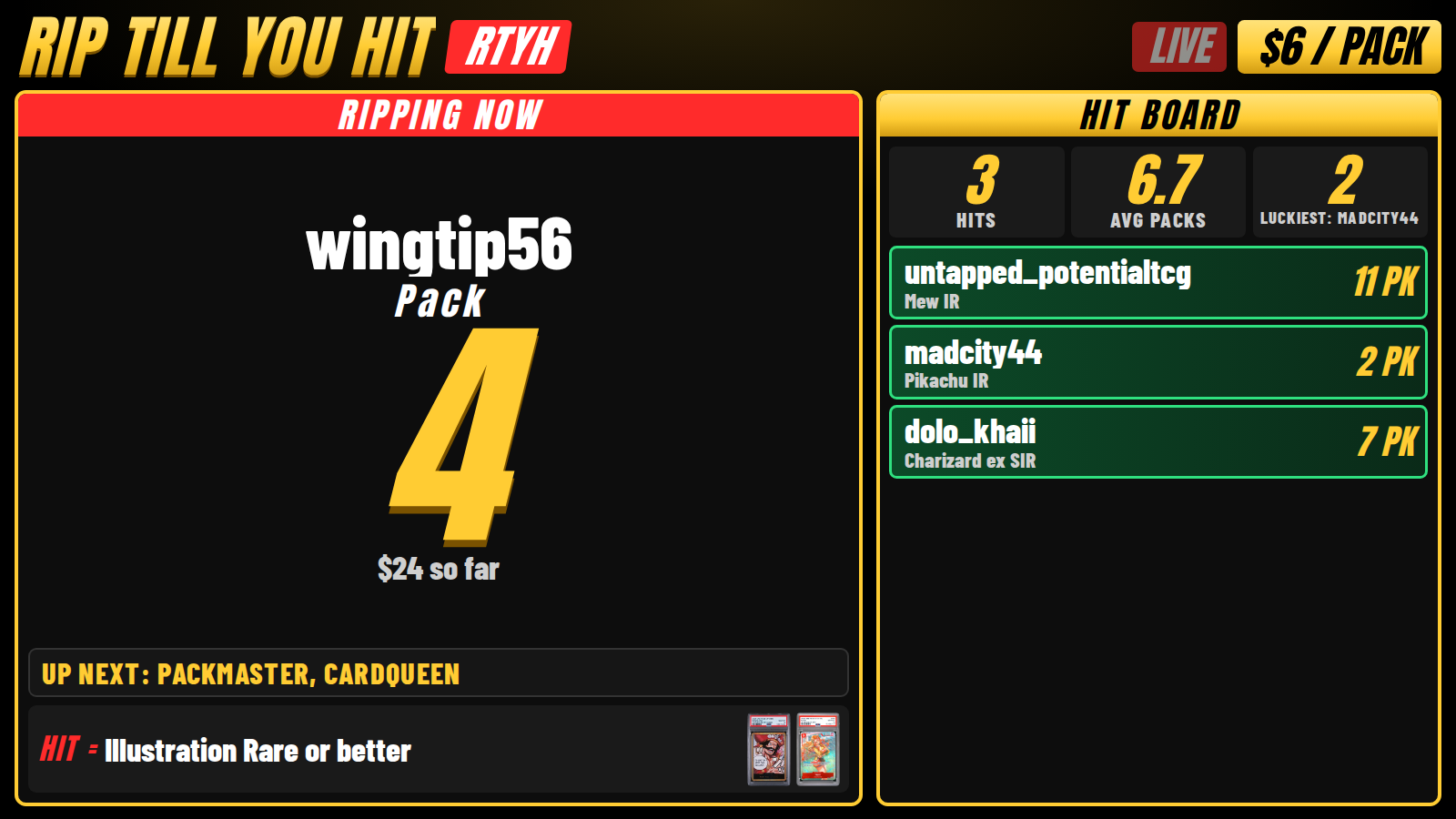
Big pack counter for the person ripping now. Add each buyer at the bottom. Type the hit card when it lands and the board yells HIT!
Pick Your Type
A color grid. Type the buyer next to their type. Works for Pokemon types or One Piece colors.
Case Break
Tracks every box (sealed, ripping, done), up to 24 spots, and a live hit list.
Wall of Hits
Shows off the newest big pull, plus a wall of the night's hits. Great for clips.
?sound=1 to the end of a game board address to play a chime on every hit.6Adding prize pictures
The board needs a direct picture link. The easy way:
- Open the Picture Link Maker.
- Drag the product photo onto it from any website. Or paste a link.
- If the picture shows up with a green check, click Copy link.
- Paste it in the picture box in your sheet.
Using your own photo? Upload it to Google Drive. Click Share, set it to Anyone with the link, copy the link, and paste it in. The board fixes Drive links for you.
7Shop orders and labels
You can sell spots as products in your shop. When someone buys one, this all happens by itself:
- The order comes in (TikTok Shop orders show up in Shopify too).
- The buyer gets the next open spot on the right board.
- A line is added to the LABELS tab.
- The Print Station prints a spot label with the spot number, the buyer, and the order number.
You just rip and read the label. No typing.
Set it up once
- Make a product for each game you sell, like Wacky $10 Spot. Turn on inventory tracking and set it to 24 so you never sell more spots than the board has.
- Open the SHOP tab in your main sheet. Type part of the product name in column A and the board in column B (
AUCTION,$10,$30,TYPES,CASE, orRTYH). TypeYESin the ON column. - For Pick Your Type, make the product options match your types (Fire, Water...). The buyer lands on the type they picked.
- On the computer with your label printer, open the Print Station. Pick your label size. Click Print a test label.
- Type
YESnext to Test Order in the SHOP tab. In about a minute a pretend order lands on the board and a label prints. Delete the test name when you're done.
8Best settings
| Thing | Set it to | Why |
|---|---|---|
| TV picture mode | Standard or Game. Motion smoothing OFF. | Keeps text sharp on camera. |
| TV brightness | About 60% | Too bright looks washed out on a phone. |
| Browser zoom | 100% | The board sizes itself to the screen. |
| Board layout | Wide TV = normal. Tall screen = tall layout (it switches by itself). | Fits any screen. |
| Phone camera | Back camera, 1080p, 30 fps | Sharp and smooth without heating up the phone. |
| Phone focus | Tap and hold on the TV to lock it | Stops the picture from pulsing. |
| Phone | Plugged in, Do Not Disturb on | No dead battery, no pop-ups on stream. |
| Internet | 10 Mbps upload or more, cable if you can | Stops freezing. |
| OBS (optional) | Browser Source, paste the OBS link from the boards page, 1920 x 1080 (or 1080 x 1920 for vertical) | Puts the board right in your video. |
| TikTok LIVE Studio (optional) | Add the board as a window capture or link source | Same idea as OBS, if your account has LIVE Studio. |
9Play by the rules
Each app has its own rules for breaks. Rules change, so check them before you run a new game.
- TikTok Shop allows breaks like personal breaks, pick your team or type, pull till you win, and case breaks. It bans things like bounties, pull games, King of the Hill, random teams, drafts, and points breaks.
- Whatnot doesn't allow prizes that depend on what gets pulled. Bonus items are fine when everyone who buys is guaranteed to get them, and you say so up front.
- Always show what's in the box, what a spot gets, and the price before anyone buys.
10Fixing problems
The board says it can't read my sheet.
Your sheet is private. Click Share, set General access to Anyone with the link, and pick Viewer.
I typed a name but the board didn't change.
Wait 5 seconds. Make sure you're in the tab the board is showing (check the LIVE tab). Make sure the spot number is in column A and the name is in column B.
My prize picture won't show.
The link is probably a web page, not a picture. Use the Picture Link Maker. For Drive photos, set sharing to Anyone with the link.
The board looks blurry on stream.
Lock your camera focus on the TV, turn the brightness down, and turn off motion smoothing on the TV.
A shop order didn't show up.
Look at Last Checked in the SHOP tab. If it says PROBLEM, message us. Make sure the product name matches a row in the SHOP tab and that row says YES. Orders only count once they're paid.
The label didn't print.
Keep the Print Station page open and make sure Auto print says ON. Set your label printer as the default printer. Click Print a test label to check.